
Quinnipiac University

Frequently Asked Questions (FAQs)

Review a list of the most frequently asked questions we receive in the Registrar's office on such topics as registering for courses and ordering a transcript.

Registration FAQs

Currently enrolled undergraduate and graduate Quinnipiac students will be assigned a registration date based on the total number of credits they have completed. During this timeframe, students will be allowed to register for the upcoming term, using Self-Service

  • Fall/Summer registration happens in the spring term, around March.

  • Spring/J-Term registration happens in the fall term, around the end of October into November.

Learn more about the registration process

Registration for students not currently enrolled at Quinnipiac is completed on a first-come, first-served basis. Enrollment limitations are strictly enforced. Students can check for course availability on Self-Service

Students should use the Course Registration Form

Currently enrolled undergraduate and graduate QU students will be assigned a registration date based on the total number of credits they have completed.

You may view your registration date under "Plan & Schedule" on Self-Service
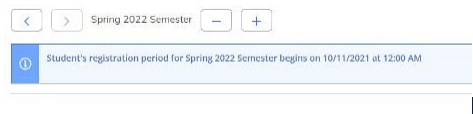
Student's registration date appears below the selected semester

Registration will be open to all currently enrolled students the week following the assigned dates through the first week of classes, except for some blackout dates due to billing.

View details about when registration takes place

To add an additional term:

  1. Log into Self-Service

  2. Navigate to the "Plan your Degree and Schedule your courses" page within the Academics section

  3. Click on the plus sign (+) that appears next to semester at the top of the page, as shown here:
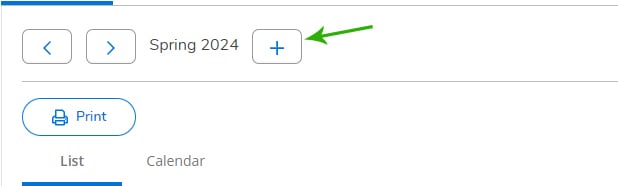
    Click the plus sign to add a new term 

  4. Select the term you need from the drop down menu, and then click "Add Term"

Typically, science lectures also require lab registration as a co-requisite (for example, BIO 101 and BIO 101L). To successfully add these courses, you must register for them simultaneously. Do this by planning both the lecture and lab into your schedule and use the Register Now button in the upper right-hand corner of the plan and schedule screen.

If there is a hold on your account, a red box will show in the upper-right corner of Self-Service with the corresponding notification on how to resolve the hold.

An example is below:
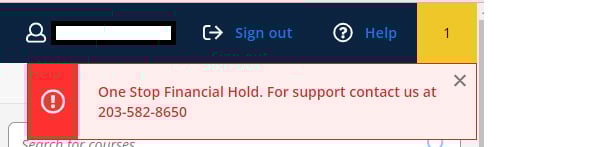
An alert message in a red box from the upper-right corner of Self-Service 


  1. Log into Self-Service

  2. Click on Student Planning

  3. Click on View Your Progress

  4. Click on Show Program Notes

  5. Your adviser's name will appear with your program

If you are trying to get added to a closed section of a course, or if you do not meet the requisites, you will need special permission, which is only granted in extenuating circumstances. Learn more about how to contact your school to request permission to add a course to a student schedule

Transcript FAQs

According to the Family Educational Rights and Privacy Act (FERPA), secondary educational institutions must have written permission from the student to release all educational records. This is applicable to all schools that receive Title IV funds from the U.S. Department of Education. Learn more about FERPA

Learn more about setting up a proxy

Current Quinnipiac students may generate an unofficial transcript and an enrollment verification letter by following these steps:

  1. Visit Self-Service on MyQ

  2. Click on Academics on the left-hand side, and then Unofficial Transcript

Unofficial transcripts are not available for former Quinnipiac students.  Former students may submit a request to order their transcript using Parchment.

Your grade point average (GPA) is included as part of your academic record. Quinnipiac does not calculate or provide class rank.

Course descriptions may be found in the academic catalog at catalog.qu.edu.

Third parties, such as a loan provider or insurance company, may use DegreeVerify through the National Student Clearinghouse.

Academic Integrity FAQs

Quinnipiac University maintains records of all violations of the Academic Integrity & Accountability Policy. These records are confidential and are not public records. If you have a question about your academic integrity history, please contact the Coordinator of Academic Integrity & Accountability at integrity@qu.edu.

If a student receives a sanction from the Academic Integrity & Accountability (AIA) Board that results in a Withdrawal with an Academic Integrity notation (WAI) or a Failure due to an Academic Integrity violation (FAI), this notation will appear on the student’s official academic transcript. Other academic integrity records are maintained internally and are not visible on transcripts unless a transcript notation is required by policy.

Students may submit a request for remediation to have a WAI or FAI notation removed from their academic record if either of the following conditions is met:

  • Two full semesters or terms have passed since the date of the sanction with no subsequent academic integrity violations, or

  • The student has completed the requirements for graduation, whichever occurs first.

If the petition is approved and the student successfully completes the remediation requirements administered by the Office of Academic Integrity & Accountability, a grade of WAI will be converted to W, and a grade of FAI will be converted to F on the academic record.

Suspension or expulsion from the university resulting from severe violations of the Academic Integrity & Accountability Policy will be noted on the student’s official transcript, and may not be remediated.

Some graduate programs and certifying boards may ask you to disclose an AIA violation. It is in your best interest to divulge this information, keeping with academic honesty that you have learned about as part of the adjudication process. If you require a letter from the Office of Academic Integrity & Accountability regarding your violation, please email the Coordinator of Academic Integrity & Accountability at integrity@qu.edu. Please include your student ID number and specify the semester and year when the violation(s) took place.

Some graduate programs and certifying boards may ask you to disclose an AIA violation. It is in your best interest to divulge this information, keeping with academic honesty that you have learned about as part of the adjudication process. If you require a letter from the Office of Academic Integrity & Accountability regarding your violation, please email the Coordinator of Academic Integrity & Accountability at integrity@qu.edu. Please include your student ID number and specify the semester and year when the violation(s) took place.

Questions

Office of the Registrar
Email: registrar@qu.edu
Phone: 203-582-8695
Fax: 203-582-8749