

Quinnipiac University

Registering for Academic Courses

Last updated February 17, 2026

Academic Support | Academic Advising and Registration

Course Listings

You may use our online course catalog to search for available courses and course sections.

Course Search

When To Register for Courses

Summer and Fall 2026 Courses

Student currently enrolled in a degree program are assigned dates for when they may begin registering for classes. Class registration opens on a specific day based on the type of student you are and how many credits you have completed. You may make changes to your course selection during the registration period up until a specific date in the semester. 

To verify when you should register for your courses, log into Self-Service

Registration Dates

Students are assigned their day to register for courses based on how many credits they have completed:

Credits Completed Registration Date
Graduate/doctoral students Monday, March 16 – Friday, April 17*
Undergraduates with more than 87 credits Monday, March 23**
Undergraduates with 57-86 credits Tuesday, March 24**
Undergraduates with 27-56 credits Thursday, March 26**
Undergraduates with 0-26 credits Friday, March 27**

*Graduate/Doctoral student appointments begin at 7 a.m. and students are encouraged to register at their earliest convenience.
**Undergraduate students can register on their appointment day and time through 11:59 p.m. Please see below for additional registration periods.

Additional Registration Period

All students (degree and non-degree) have the opportunity to register and make changes to their schedules according to the dates below:

  • March 30 – April 17: Registration open for all current degree seeking students at all academic levels for Summer and Fall 2026

  • April 27 – May 18: Registration open for all returning and non matriculated students for Summer 1 2026

  • April 27 – May 31: Registration open for all returning and non matriculated students for Fall 2026

  • April 27 – July 6: Registration open for all returning and non matriculated students for Summer 2 2026

  • June 1 – July 15: New First Year and transfer students register at Orientation

  • July 15 – August 28: Registration open for all returning and non matriculated students for Fall 2026 


Add/Drop Period

The opportunity to add or drop courses and make changes to a student's schedule up to a certain date is called the add/drop period. 

  • Summer 1:

    • May 19: Add/drop period ends for Summer 1 5-week (May 18 – June 18) and 7-week (May 18 – July 2) courses

    • May 22: Add/drop period ends for Summer 15 week (May 18-August 21) courses

  • Summer 2:

    • July 7:  Add/drop period ends for Summer 2 5-week (July 6 – Aug 7) and 7-week (July 6 – Aug 21) course

  • Fall semester:

    • August 25: Add/drop period ends for first 7-week (Aug 24 – Oct 10) courses

    • August 28: Add/drop period ends for 15-week (Aug 24 – Dec 12) courses

    • October 20: Add/drop period ends for second 7-week (Oct 19 – Dec 12) courses

After the add/drop period students will need to withdraw from courses and receive grades of “W.”

See the full list of key dates and withdrawal deadlines on the academic calendar

Registration FAQs

Currently enrolled undergraduate and graduate Quinnipiac students will be assigned a registration date based on the total number of credits they have completed. During this timeframe, students will be allowed to register for the upcoming term, using Self-Service

  • Fall/Summer registration happens in the spring term, around March.

  • Spring/J-Term registration happens in the fall term, around the end of October into November.

Learn more about the registration process

Registration for students not currently enrolled at Quinnipiac is completed on a first-come, first-served basis. Enrollment limitations are strictly enforced. Students can check for course availability on Self-Service

Students should use the Course Registration Form

Currently enrolled undergraduate and graduate QU students will be assigned a registration date based on the total number of credits they have completed.

You may view your registration date under "Plan & Schedule" on Self-Service
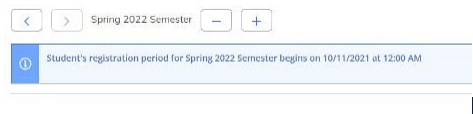
Student's registration date appears below the selected semester

Registration will be open to all currently enrolled students the week following the assigned dates through the first week of classes, except for some blackout dates due to billing.

View details about when registration takes place

To add an additional term:

  1. Log into Self-Service

  2. Navigate to the "Plan your Degree and Schedule your courses" page within the Academics section

  3. Click on the plus sign (+) that appears next to semester at the top of the page, as shown here:
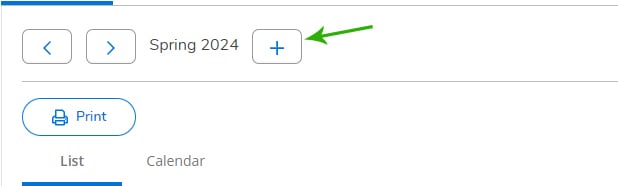
    Click the plus sign to add a new term 

  4. Select the term you need from the drop down menu, and then click "Add Term"

Typically, science lectures also require lab registration as a co-requisite (for example, BIO 101 and BIO 101L). To successfully add these courses, you must register for them simultaneously. Do this by planning both the lecture and lab into your schedule and use the Register Now button in the upper right-hand corner of the plan and schedule screen.

If there is a hold on your account, a red box will show in the upper-right corner of Self-Service with the corresponding notification on how to resolve the hold.

An example is below:
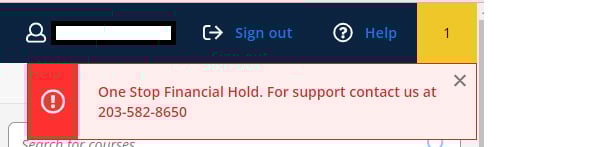
An alert message in a red box from the upper-right corner of Self-Service 


  1. Log into Self-Service

  2. Click on Student Planning

  3. Click on View Your Progress

  4. Click on Show Program Notes

  5. Your adviser's name will appear with your program

If you are trying to get added to a closed section of a course, or if you do not meet the requisites, you will need special permission, which is only granted in extenuating circumstances. Learn more about how to contact your school to request permission to add a course to a student schedule

Questions

Office of the Registrar
Email: registrar@qu.edu
Phone: 203-582-8695
Fax: 203-582-8749